5. Making the fingers move
Overview
As it was shown before, one of the easiest ways to deploy motions of the bionic hand could be by a servo motors that are pulling strings (“tendons”), connected to furthermost moving part of a finger (see Fig.35).

Figure 35. Moving a finger of the bionic hand
The motors could be controlled by a comparatively autonomous electronic device - a single board computer (SBC) of a size of a credit card. There are plenty of such devices on the market, but the suggested one is the Arduino UNO microcontroller (see Fig.36), because:
- It is open-source based, comparatively cheap and extremely popular among the enthusiasts in electronics and small automation;
- It is included as one of simulated virtual devices in a Tinker CAD – a web-based free platform for design learning. This is a particular advantage as 3D modelling, circuit and software design could be performed within the same environment. Furthermore, the virtual design, modelling and testing of the hardware and the software will help to avoid save equipment damage (therefore- some expenses), as the virtual hardware elements does not get out of order, if connected and used improperly. Some recommended preventive preparation steps before deploying the design in a real hardware will be mentioned below.
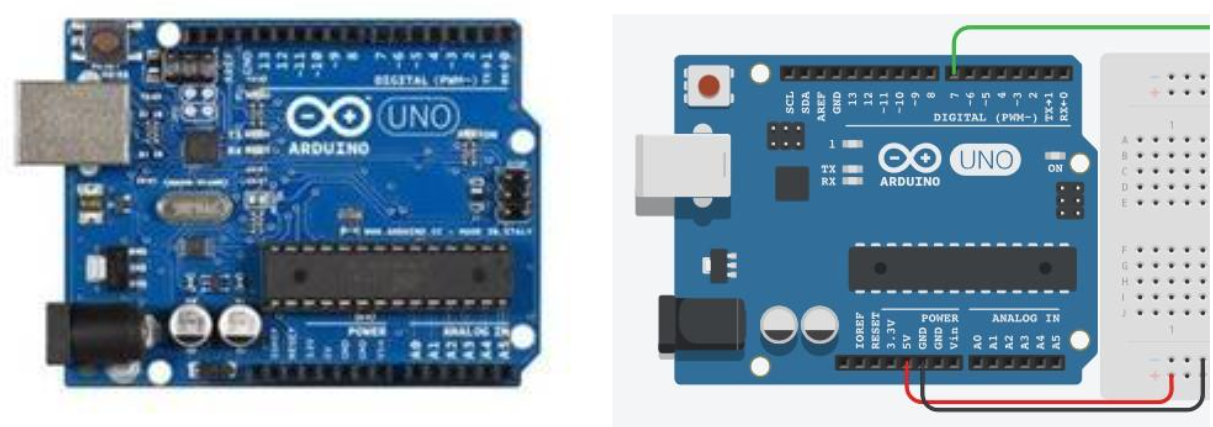
Figure 36. Arduino UNO microcontroller (real view- left, virtualised in TinkerCAD- right)