2. Program Interface and Main Elements
Program Interface
After logging into your Tinkercad account, you will see the main interface.
Main Interface Sections:
-
– Account Information – Here, you can check and update your personal account settings.

Figure 4. Personal Account Information
-
– Teaching Tools – Standard guidelines are provided for teaching how to use Tinkercad. You can also create a custom teaching plan.
-
– Learning Tools – Lessons on how to design specific models.
-
– Blog – A space where users share their experiences and insights on 3D modeling with Tinkercad. You can also create your own blog
-
– Project Gallery – Most created designs can be downloaded as finished products. You can also download and modify existing models.
-
New Modeling Workspace Setup – This feature allows you to prepare a new modeling environment, which we will discuss in more detail in the next section.
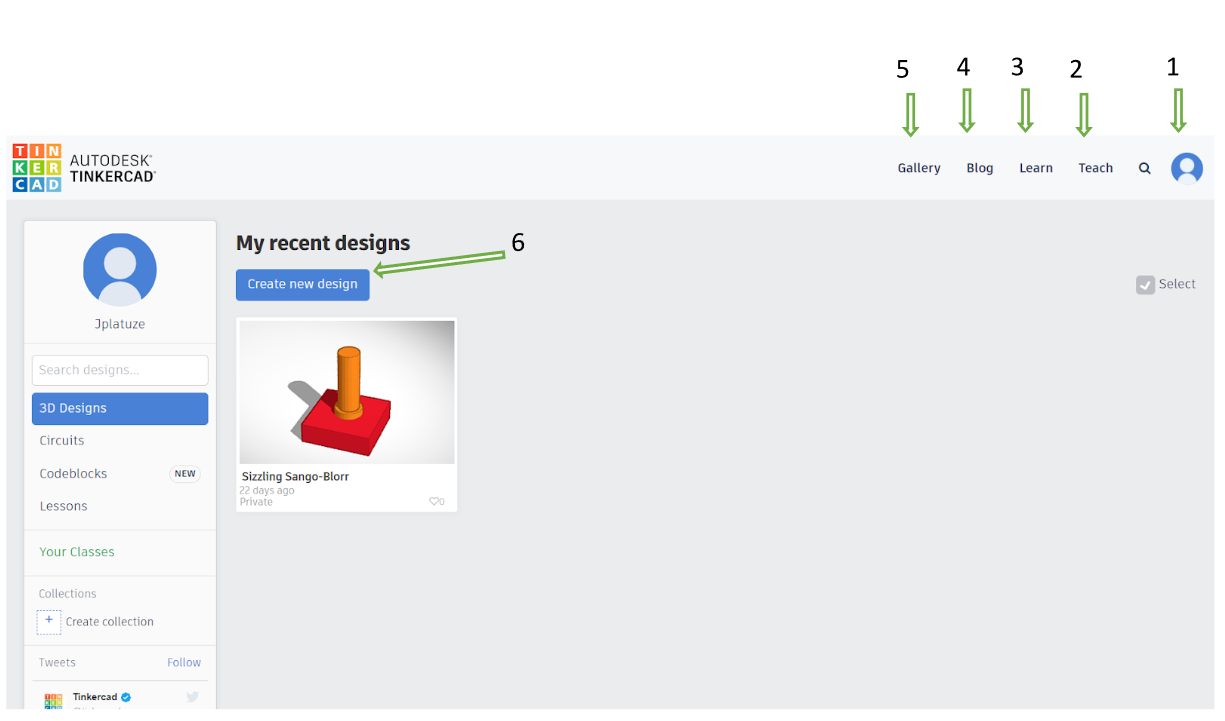
Figure 5. Workspace Environment