3. Modelling software overview
| Site: | Bios4You |
| Course: | (4) Robotics in Biotechnology |
| Book: | 3. Modelling software overview |
| Printed by: | Επισκέπτης (Guest user) |
| Date: | Tuesday, 25 August 2026, 6:42 AM |
AutoCAD software
The program is designed for modelling two-dimensional and three-dimensional drawings, diagrams and images. There are numerous environments implemented in the software. These environments differ only in the tools icons in the menu bar. If you know name of the function, it doesn’t matter in witch environment you are working. The program communicates with the user via the command line. Starting from version 2018, for the convenience of the user, it is enough the cursor to be in the program window, when you start typing the name of the function, the program "offers" possible commands for the manipulation. Big advantage of this program is easy generation of projections from a three-dimensional model. Once a model has been created, a material or group of materials can be assigned to it. This program is not very suitable for visualization, because in order to get the most realistic image, it takes many computer resources for calculations – to adjust lighting, materials and other parameters.

Figure 16. AutoCad application environment
Fusion 360 software

Figure 17. Fusion 360 Application environment
Fusion 360 is a simpler, less skilful program. Having all the same tools as AutoCad. One of the advantages is easier material collection. The created model is easy to upload to a photo of the real environment, viewed from all sides.

Figure 18. View the model by "hiding" part of the objects
Blender software
An open source program for 3D modelling and animation. The main advantage of this software that it is free and easy to install. The disadvantage – it is quite complex to work with, requiring more skills and experience. The icons are not arranged in the menu bar. Knowing the name of a function makes it easy to call it through a search. This program has most of the benefits of the programs listed above. The modelling can be performed in more than one method. One way is to modify three-dimensional primitives, such as cube, cylinder, sphere. The feature of the program is the possibility of animation. It is possible not only to design a model, but also to see how it can actually move. For example, when constructing a hand, the app allows you to add restrictions so that your fingers can only bend to a predetermined angle, not 360 degrees. Another advantage is the material settings. Program focuses on 3D animation, silky material, hair, water, and other materials can be extracted for realistic images. Like other simulation programs, it has the ability to export the file to *.stl format, ready for 3D printing.

Figure 19. Blender software environment
TinkerCad software
One of the main advantages over the programs listed above is the ability to work online. This is an Autodesk software package that can offer many additional tools with a license. However, for small projects, the tools offered by manufacturers in the free online version are fully sufficient.

Figure 20. TinkerCad application environment
The program is especially suitable for children because all the tools are visible and clearly understood. This online version has advantages. The teacher can create classes and teach for the whole class. Projects can also be done in teams by "inviting" another user to the project. Another very handy tool is comments. They can be both written and hidden. The program allows you to import already created *.STL files and edit them. There may be problems editing individual blocks in the model because such blocks are "locked" by grouped parts.
Which program to choose for modelling, depends primarily on the goal and the user’s skills.
Related links
- 3D printing parts of car: https://blogs.3ds.com/3dsmobility/wp-content/uploads/sites/13/2017/04/AdditiveManufacturing.jpg
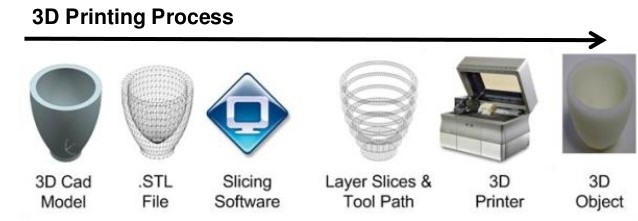
- 3D printing process:
- Steps of 3D printing: https://upload.wikimedia.org/wikipedia/commons/2/2c/3d-printing-a-2014horizonwatching-trend-summary-report-9-638.jpg
- 3D printer: https://www.cleanpng.com/png-3d-printing-filament-3d-printers-aleph-objects-inc1348799/preview.html