5. Making the fingers move
Arduino UNO in Tinker CAD
The electronics and software design modelling happens entering the “Circuits” section (Fig. 38) in the Tinker CAD (the “3D design” section might have been used before for modelling parts of fingers). One can find a comprehensive library of Tinker CAD examples and designs for learning.
The graphical development environment of the Tinker Cad contains 2 parts: a virtual electronics on the left and electronic elements collections or programming editor on the right (as seen on Fig. 39). The latter could be used in two alternative modes:
- C program editor, like in SKETCH – one can export a C program file to be loaded to a real UNO;
- Graphical programming environment “CodeBlocks”, extremely similar to SCRATCH2. The CodeBlocks program is automatically converted to a C program (but it is not a case in opposite direction, one should be careful not to lose own work).
There will be 5 servo-motors used to move fingers of the bionic hand in the virtual experiment, schematically shown on Figure 39 and Figure 40. The motors will be controlled and driven by the UNO, and 10 buttons (5 fingers x 2 directions = 2 rows of buttons) will be used to initiate the motion.
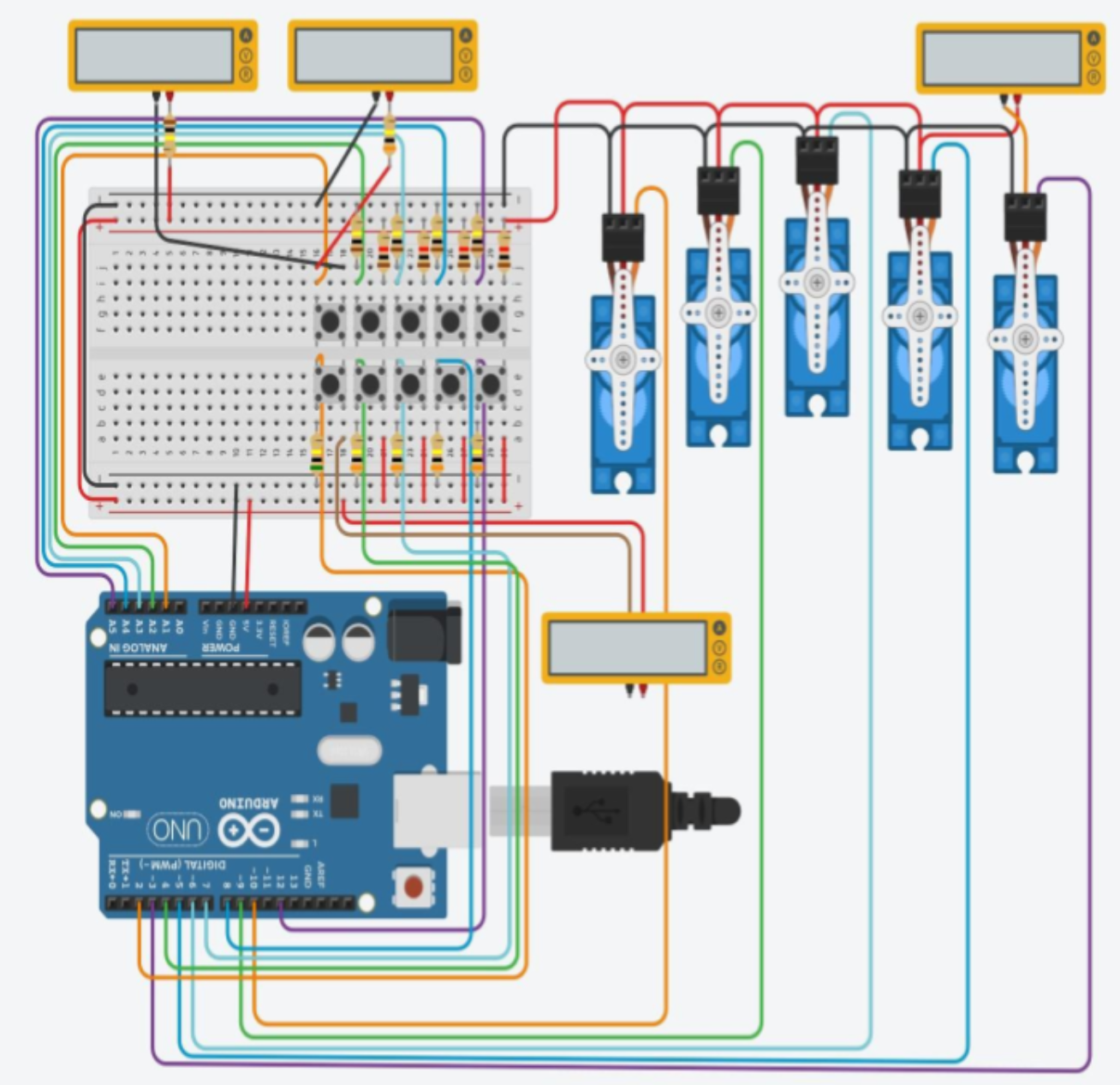
Figure 40. The virtual experiment - moving 5 servo-motors (fingers) by UNO. There are additional multimeters used to check the current through buttons and a servo-motor, in order to avoid possible overload
The servo-motor is a digital device, turning a spindle to a given position (usually from 0 to 180 degrees). The motors (control pins) should be connected to PWM (Pulse-Width Modulation – the way to specify a rotation position) marked digital outputs of the UNO. Totally, there are 6 such (PWM) digital outputs in an UNO.
One set of buttons (e.g. “Up”) will be connected to analog inputs of an UNO, another set (e.g. “Down”) of buttons - to digital inputs of an UNO. It should be mentioned, that connecting a button to an analog input and reading the value requires slightly more efforts than a to digital one.
2 Graphical programming environment, designed by MIT.EDU and widely used to teach programming at schools https://scratch.mit.edu/