Developing a program
The Tinker CAD graphical programing environment (GPE) is limited to the development of the loop() function only, the setup() is deployed as default. That minor limitation could be overcome continuing further development only in C (no CodeBlocks), what might be acceptable for bigger practical applications. The GPE contains 6 kinds of “CodeBlocks” operations, coded in different colors (Fig. 41a): variables, control, output, input, math (includes calculation of meeting a condition, so called Boolean operations, used within control statements), notation (comments). The statements of different kinds are combined with each other according their shapes.
|
The program that moves servo-motors (“fingers”) consists of one minor part and two major ones (Fig. 41b), separated by comments in grey:
-
Setting the rotation speed (rotationStep variable, pink) – while transferring the program to a real UNO, one can shift this statement into the setup() procedure.
-
Giving instructions for each servo-motor to rotate to a certain position – 5 outputs (blue), where one should be careful to specify the correct output pin (on the UNO board) and position (different variables, pink). As these variables are set by default to 0 during the setup(), nothing happens after a power-on, until any button is pressed.
-
Checking the button pairs and recalculating the position of servo-motors. This part is repeated (only one visible in Fig. 41b) 5 times for each set of 2 buttons and a servo-motor.
-
The state (voltage) of button ”Up” is read from an analog input. The possible read-out range is from 0 to 1023 units, corresponding to 0 and 5 Volts respectively. One should be careful to specify the correct input pin on the UNO board.
-
If the read value is greater than 256 (1.25V), then the position of a particular servo-motor should be recalculated, increasing it by a value of rotationStep;
-
The calculated position should not exceed 180°. If it happened, it is set to this limiting value.
-
If the button “Up” was not pressed, the else branch is executed.
-
The state of button ”Down” is read from a digital input (0 = No, or 1 = Yes). One should be careful to specify the correct input pin on the UNO board.
-
If the read value is greater or equal 1, then the position of a particular servo-motor should be recalculated, decreasing it by a value of rotationStep. An additional arithmetic (math, green category) operation was necessary to obtain a negative value of rotationStep).
-
The calculated position should not drop below 0°. If it happened, it is set to this limiting value.
|
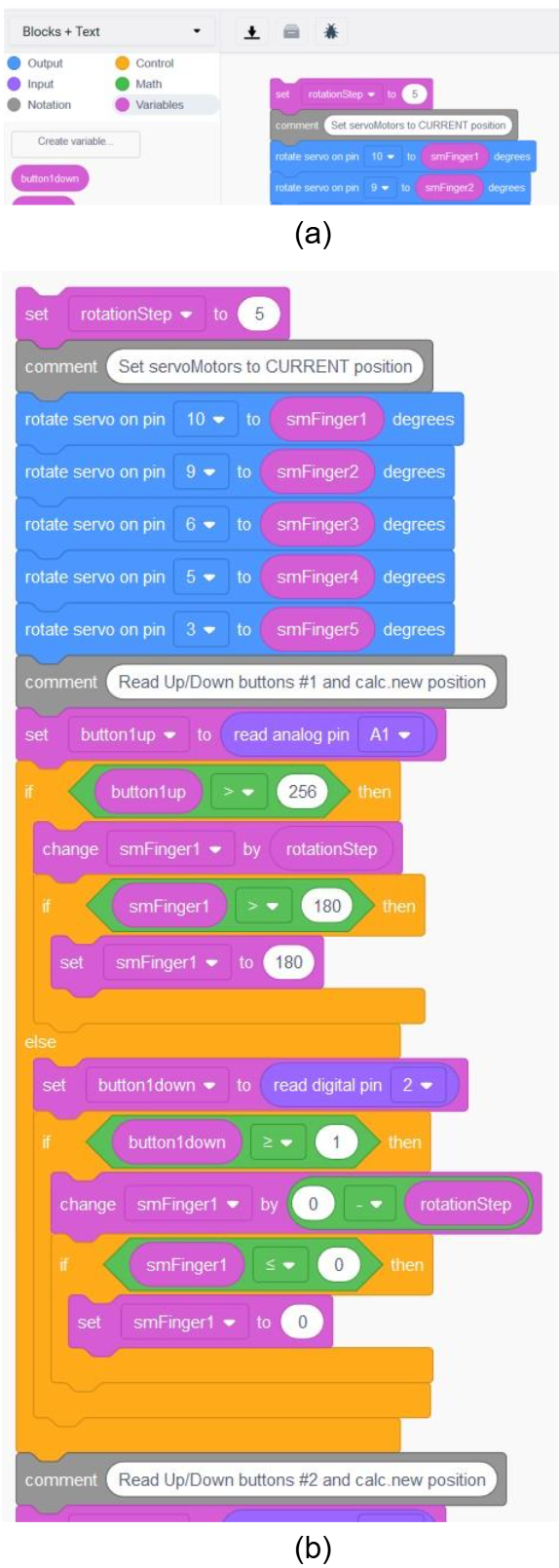
Figure 41. Part of graphical program for actuating servo-motors
|